

🔍 What It Does
This action queries selected categories in your Knowledge Base and retrieves the top-matching documents from each, based on a similarity threshold. It’s useful when your assistant needs a balanced perspective across multiple content segments.✨ Use this when you want to fetch the most relevant documents from several categories, rather than the overall best matches.
🖼️ Action Interface
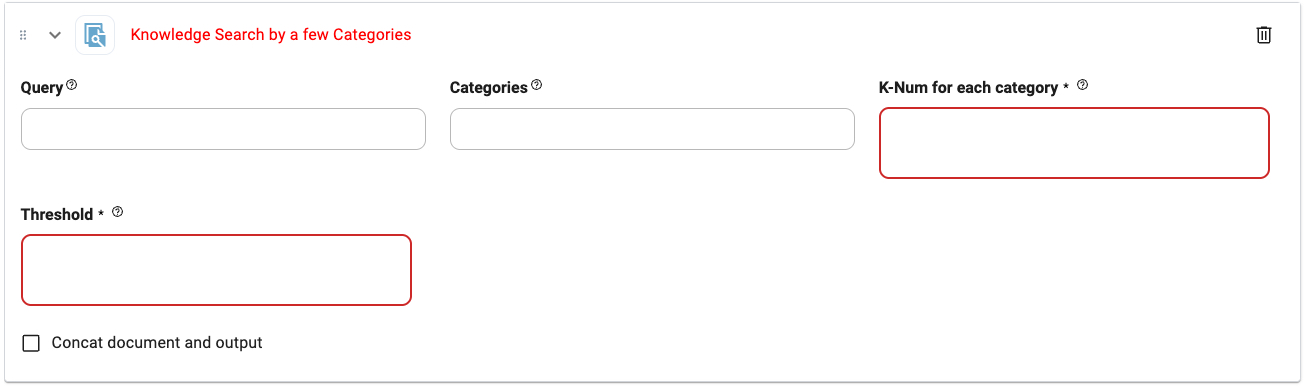
⚙️ Configuration Options
Query
Query
Type:
string
The search term or question. Supports dynamic values using parameters (@yourParam).Example: @userIntent, return policyCategories
Categories
Type:
string
Comma-separated list of Knowledge Base categories to search across.Example: Returns, Shipping, BillingK-Num for each category (required)
K-Num for each category (required)
Type:
number
Sets how many documents to return per category.
Set to 0 to include all relevant documents in each category.Example: 3Threshold (required)
Threshold (required)
Type:
float
Sets the similarity filter (range: 0.0 to 1.0).0.0= highly relevant only1.0= return all documents
0.25Concat document and output
Concat document and output
Type:
boolean
When enabled, combines the retrieved document content with any existing output before passing it to the next action.🧵 Tips
- Use when you want more structured knowledge retrieval across defined segments.
- Great for assistants that need to consult multiple product/service areas.
- Works well as a first step in a multi-step reasoning chain.